<?xml version="1.0" encoding="utf-8"?><feed xmlns="http://www.w3.org/2005/Atom" ><generator uri="https://jekyllrb.com/" version="3.10.0">Jekyll</generator><link href="https://vijaye-bass.github.io/feed.xml" rel="self" type="application/atom+xml" /><link href="https://vijaye-bass.github.io/" rel="alternate" type="text/html" /><updated>2026-06-24T03:55:53+00:00</updated><id>https://vijaye-bass.github.io/feed.xml</id><title type="html">vijaYE-bass</title><subtitle>Music production notes</subtitle><author><name>vijaYE-bass</name></author><entry><title type="html">First post</title><link href="https://vijaye-bass.github.io/2026/06/24/first-post.html" rel="alternate" type="text/html" title="First post" /><published>2026-06-24T00:00:00+00:00</published><updated>2026-06-24T00:00:00+00:00</updated><id>https://vijaye-bass.github.io/2026/06/24/first-post</id><content type="html" xml:base="https://vijaye-bass.github.io/2026/06/24/first-post.html"><![CDATA[<p>Getting the blog set up. More soon.</p>]]></content><author><name>vijaYE-bass</name></author><summary type="html"><![CDATA[Getting the blog set up. More soon.]]></summary></entry><entry><title type="html">Controlling REAPER with Claude Code via MCP</title><link href="https://vijaye-bass.github.io/2026/06/24/reaper-mcp-claude.html" rel="alternate" type="text/html" title="Controlling REAPER with Claude Code via MCP" /><published>2026-06-24T00:00:00+00:00</published><updated>2026-06-24T00:00:00+00:00</updated><id>https://vijaye-bass.github.io/2026/06/24/reaper-mcp-claude</id><content type="html" xml:base="https://vijaye-bass.github.io/2026/06/24/reaper-mcp-claude.html"><![CDATA[<p>REAPER has a Python API called <a href="https://python-reapy.readthedocs.io/">reapy</a> that
exposes the full REAPER extension API over a local socket. This post documents how
I wired it up to Claude Code so I can control REAPER through natural language in my
terminal.</p>

<h2 id="architecture">Architecture</h2>

<p>Claude Code’s MCP server subprocesses run inside a sandbox that blocks direct TCP
connections to localhost. So a direct reapy connection from the MCP server isn’t possible.
The solution is a bridge process that runs outside the sandbox:</p>

<div class="language-plaintext highlighter-rouge"><div class="highlight"><pre class="highlight"><code>Claude Code (MCP client)
    │
    ▼ file IPC via /tmp/reaper_rpc/
bridge.py  (runs in terminal, outside sandbox)
    │
    ▼ TCP localhost:2306
REAPER + reapy server
</code></pre></div></div>

<p>The MCP server writes tool call payloads to files in <code class="language-plaintext highlighter-rouge">/tmp/reaper_rpc/</code>. The bridge
watches that directory, executes the calls via reapy, and writes responses back.</p>

<h2 id="setup">Setup</h2>

<p><strong>1. Start REAPER.</strong> The reapy server starts automatically on port 2306 once you’ve
installed the reapy REAPER extension.</p>

<p><strong>2. Start the bridge</strong> (keep this terminal open):</p>

<div class="language-bash highlighter-rouge"><div class="highlight"><pre class="highlight"><code><span class="nb">cd</span> ~/claude/reaper-mcp
uv run python3 scripts/start_bridge.py
</code></pre></div></div>

<p><strong>3. Reconnect MCP</strong> in Claude Code: <code class="language-plaintext highlighter-rouge">/mcp</code></p>

<h2 id="what-it-can-do">What it can do</h2>

<p>With 58 tools exposed, you can do things like:</p>

<ul>
  <li>Create, rename, delete, color tracks</li>
  <li>Set volume, pan, mute, solo</li>
  <li>Add FX and set parameters</li>
  <li>Create MIDI items and drum patterns</li>
  <li>Analyze loudness, dynamics, frequency spectrum</li>
  <li>Render stems or the full project</li>
  <li>Set tempo and time signature</li>
</ul>

<h2 id="falling-back-to-reapy-directly">Falling back to reapy directly</h2>

<p>Some things aren’t exposed by the MCP tools (e.g. recording input assignment).
For those, I drop down to reapy directly:</p>

<div class="language-python highlighter-rouge"><div class="highlight"><pre class="highlight"><code><span class="kn">import</span> <span class="nn">reapy</span>
<span class="n">reapy</span><span class="p">.</span><span class="n">connect</span><span class="p">()</span>
<span class="n">p</span> <span class="o">=</span> <span class="n">reapy</span><span class="p">.</span><span class="n">Project</span><span class="p">()</span>
<span class="n">t</span> <span class="o">=</span> <span class="n">p</span><span class="p">.</span><span class="n">tracks</span><span class="p">[</span><span class="mi">0</span><span class="p">]</span>
<span class="n">t</span><span class="p">.</span><span class="n">set_info_value</span><span class="p">(</span><span class="s">'I_RECINPUT'</span><span class="p">,</span> <span class="mi">1034</span><span class="p">)</span>  <span class="c1"># ADAT 1/2
</span></code></pre></div></div>

<h2 id="track-color-encoding">Track color encoding</h2>

<p>One gotcha: <code class="language-plaintext highlighter-rouge">set_info_value('I_CUSTOMCOLOR', ...)</code> uses the wrong byte order on macOS
if you encode manually. Use reapy’s native <code class="language-plaintext highlighter-rouge">track.color = (r, g, b)</code> property instead,
which handles the platform-specific encoding. Then call <code class="language-plaintext highlighter-rouge">reapy.update_arrange()</code> to
force a redraw.</p>

<h2 id="current-session-setup">Current session setup</h2>

<p>9 tracks, each colored by instrument family:</p>

<table>
  <thead>
    <tr>
      <th>Track</th>
      <th>Instrument</th>
      <th>Color</th>
    </tr>
  </thead>
  <tbody>
    <tr>
      <td>Guitar</td>
      <td>Live guitar → Axe-FX</td>
      <td>Green</td>
    </tr>
    <tr>
      <td>Force</td>
      <td>Akai Force</td>
      <td>Deep orange</td>
    </tr>
    <tr>
      <td>MPC</td>
      <td>Akai MPC</td>
      <td>Amber</td>
    </tr>
    <tr>
      <td>FL Studio</td>
      <td>DAW via ADAT</td>
      <td>Blue</td>
    </tr>
    <tr>
      <td>DDJ 400</td>
      <td>DJ controller</td>
      <td>Teal</td>
    </tr>
    <tr>
      <td>Elektron</td>
      <td>Digitakt / Syntakt</td>
      <td>Black</td>
    </tr>
    <tr>
      <td>SP404</td>
      <td>Sampler</td>
      <td>Pink</td>
    </tr>
    <tr>
      <td>Hydrasynth</td>
      <td>Synth</td>
      <td>Indigo</td>
    </tr>
    <tr>
      <td>Sync</td>
      <td>Click / sync track</td>
      <td>Grey</td>
    </tr>
  </tbody>
</table>]]></content><author><name>vijaYE-bass</name></author><summary type="html"><![CDATA[REAPER has a Python API called reapy that exposes the full REAPER extension API over a local socket. This post documents how I wired it up to Claude Code so I can control REAPER through natural language in my terminal.]]></summary></entry><entry><title type="html">Setting REAPER Track Colors with Python/Claude/ReaperMCP</title><link href="https://vijaye-bass.github.io/2026/06/24/reaper-track-colors.html" rel="alternate" type="text/html" title="Setting REAPER Track Colors with Python/Claude/ReaperMCP" /><published>2026-06-24T00:00:00+00:00</published><updated>2026-06-24T00:00:00+00:00</updated><id>https://vijaye-bass.github.io/2026/06/24/reaper-track-colors</id><content type="html" xml:base="https://vijaye-bass.github.io/2026/06/24/reaper-track-colors.html"><![CDATA[<p>One of the first things I set up with the REAPER MCP integration was a coherent
color scheme across all 9 tracks. Here’s the full procedure — what works, what
doesn’t, and how to keep the TCP and mixer in sync.</p>

<h2 id="prerequisites">Prerequisites</h2>

<ul>
  <li>REAPER is open</li>
  <li>reapy server is running inside REAPER (port 2306 — starts automatically if
you have the reapy REAPER extension installed)</li>
  <li>Python environment: <code class="language-plaintext highlighter-rouge">~/claude/reaper-mcp</code> with <code class="language-plaintext highlighter-rouge">uv</code></li>
</ul>

<p>Run all snippets from that directory:</p>

<div class="language-bash highlighter-rouge"><div class="highlight"><pre class="highlight"><code><span class="nb">cd</span> ~/claude/reaper-mcp
uv run python3 <span class="nt">-c</span> <span class="s2">"..."</span>
</code></pre></div></div>

<h2 id="check-track-order-first">Check track order first</h2>

<p>Colors are applied by index (0-based). Always verify the order before running
the color script — tracks may have been reordered since the session was created:</p>

<div class="language-python highlighter-rouge"><div class="highlight"><pre class="highlight"><code><span class="kn">import</span> <span class="nn">reapy</span>
<span class="n">reapy</span><span class="p">.</span><span class="n">connect</span><span class="p">()</span>
<span class="n">p</span> <span class="o">=</span> <span class="n">reapy</span><span class="p">.</span><span class="n">Project</span><span class="p">()</span>
<span class="k">for</span> <span class="n">i</span><span class="p">,</span> <span class="n">t</span> <span class="ow">in</span> <span class="nb">enumerate</span><span class="p">(</span><span class="n">p</span><span class="p">.</span><span class="n">tracks</span><span class="p">):</span>
    <span class="k">print</span><span class="p">(</span><span class="n">i</span><span class="p">,</span> <span class="n">t</span><span class="p">.</span><span class="n">name</span><span class="p">.</span><span class="n">strip</span><span class="p">())</span>
</code></pre></div></div>

<p>Confirm the output matches the order you expect before proceeding.</p>

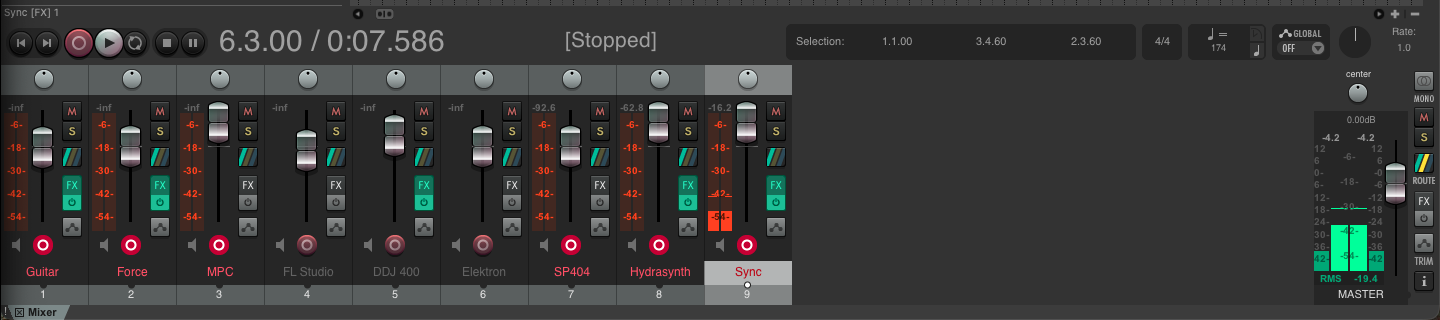
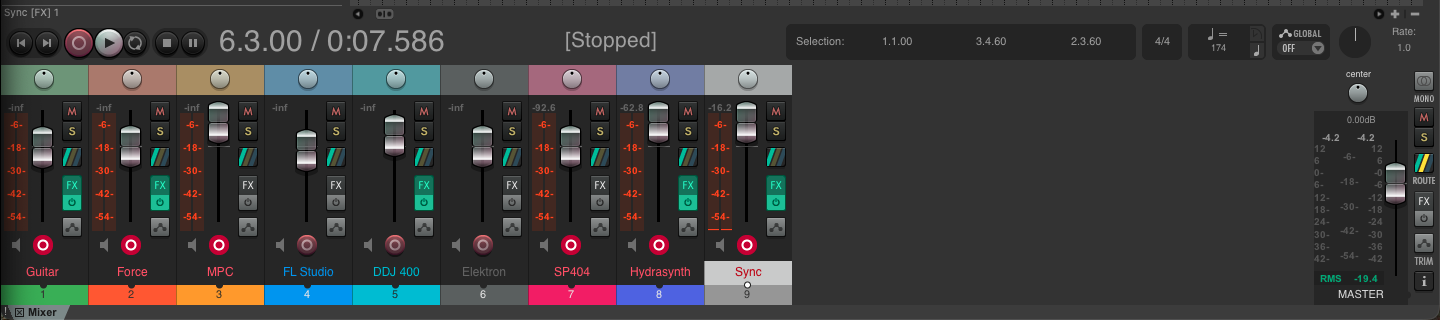
<h2 id="before-and-after">Before and after</h2>

<p>Without colors, all mixer channels look identical. At a glance you can’t tell
which strip is which, especially once you’re deep in a session.</p>

<p><strong>Before:</strong>
<img src="/assets/images/reaper-mixer-before.png" alt="Mixer with no track colors" /></p>

<p><strong>After:</strong>
<img src="/assets/images/reaper-mixer-after.png" alt="Mixer with color scheme applied" /></p>

<p>Each track now has a color band at the top of its mixer strip and a colored
number tab at the bottom. The TCP (track list on the left) gets the same color
as a full background fill.</p>

<h2 id="the-sync-problem">The sync problem</h2>

<p>REAPER has two views that both display track colors:</p>
<ul>
  <li><strong>TCP</strong> — the track control panel (left side of the arrange view)</li>
  <li><strong>MCP</strong> — the mixer control panel</li>
</ul>

<p>They’re driven by the same underlying data (<code class="language-plaintext highlighter-rouge">I_CUSTOMCOLOR</code>) but don’t always
redraw together when colors are set via the API. Calling <code class="language-plaintext highlighter-rouge">update_arrange()</code> only
refreshes the arrange view. To get both in sync you need two extra calls:</p>

<div class="language-python highlighter-rouge"><div class="highlight"><pre class="highlight"><code><span class="n">rpr</span><span class="p">.</span><span class="n">TrackList_AdjustWindows</span><span class="p">(</span><span class="bp">True</span><span class="p">)</span>   <span class="c1"># redraws TCP
</span><span class="n">rpr</span><span class="p">.</span><span class="n">ThemeLayout_RefreshAll</span><span class="p">()</span>         <span class="c1"># redraws MCP / mixer
</span></code></pre></div></div>

<p>Without <code class="language-plaintext highlighter-rouge">ThemeLayout_RefreshAll()</code>, the mixer strips stay grey even though the
color is stored correctly.</p>

<h2 id="the-wrong-encoding">The wrong encoding</h2>

<p>The first attempt used manual bit-packing:</p>

<div class="language-python highlighter-rouge"><div class="highlight"><pre class="highlight"><code><span class="c1"># WRONG on macOS — swaps R and B channels
</span><span class="n">t</span><span class="p">.</span><span class="n">set_info_value</span><span class="p">(</span><span class="s">'I_CUSTOMCOLOR'</span><span class="p">,</span> <span class="n">r</span> <span class="o">|</span> <span class="p">(</span><span class="n">g</span> <span class="o">&lt;&lt;</span> <span class="mi">8</span><span class="p">)</span> <span class="o">|</span> <span class="p">(</span><span class="n">b</span> <span class="o">&lt;&lt;</span> <span class="mi">16</span><span class="p">)</span> <span class="o">|</span> <span class="mh">0x1000000</span><span class="p">)</span>
</code></pre></div></div>

<p>On macOS, <code class="language-plaintext highlighter-rouge">I_CUSTOMCOLOR</code> expects <code class="language-plaintext highlighter-rouge">(r &lt;&lt; 16) | (g &lt;&lt; 8) | b | 0x1000000</code>.
Getting this wrong produces wrong hues — teal becomes yellow, pink becomes purple.</p>

<h2 id="the-correct-approach">The correct approach</h2>

<p>Use <code class="language-plaintext highlighter-rouge">SetTrackColor</code> with <code class="language-plaintext highlighter-rouge">ColorToNative</code> to handle the platform encoding, then
force both panels to redraw:</p>

<div class="language-python highlighter-rouge"><div class="highlight"><pre class="highlight"><code><span class="kn">import</span> <span class="nn">reapy</span>

<span class="n">reapy</span><span class="p">.</span><span class="n">connect</span><span class="p">()</span>
<span class="n">p</span>  <span class="o">=</span> <span class="n">reapy</span><span class="p">.</span><span class="n">Project</span><span class="p">()</span>
<span class="n">rpr</span> <span class="o">=</span> <span class="n">reapy</span><span class="p">.</span><span class="n">reascript_api</span>

<span class="n">colors</span> <span class="o">=</span> <span class="p">[</span>
    <span class="p">(</span> <span class="mi">76</span><span class="p">,</span> <span class="mi">175</span><span class="p">,</span>  <span class="mi">80</span><span class="p">),</span>  <span class="c1"># Guitar      — green
</span>    <span class="p">(</span><span class="mi">255</span><span class="p">,</span>  <span class="mi">87</span><span class="p">,</span>  <span class="mi">34</span><span class="p">),</span>  <span class="c1"># Force       — deep orange
</span>    <span class="p">(</span><span class="mi">255</span><span class="p">,</span> <span class="mi">152</span><span class="p">,</span>   <span class="mi">0</span><span class="p">),</span>  <span class="c1"># MPC         — amber
</span>    <span class="p">(</span> <span class="mi">33</span><span class="p">,</span> <span class="mi">150</span><span class="p">,</span> <span class="mi">243</span><span class="p">),</span>  <span class="c1"># FL Studio   — blue
</span>    <span class="p">(</span>  <span class="mi">0</span><span class="p">,</span> <span class="mi">188</span><span class="p">,</span> <span class="mi">212</span><span class="p">),</span>  <span class="c1"># DDJ 400     — teal
</span>    <span class="p">(</span>  <span class="mi">0</span><span class="p">,</span>   <span class="mi">0</span><span class="p">,</span>   <span class="mi">0</span><span class="p">),</span>  <span class="c1"># Elektron    — black
</span>    <span class="p">(</span><span class="mi">233</span><span class="p">,</span>  <span class="mi">30</span><span class="p">,</span>  <span class="mi">99</span><span class="p">),</span>  <span class="c1"># SP404       — pink
</span>    <span class="p">(</span> <span class="mi">80</span><span class="p">,</span> <span class="mi">100</span><span class="p">,</span> <span class="mi">230</span><span class="p">),</span>  <span class="c1"># Hydrasynth  — indigo
</span>    <span class="p">(</span><span class="mi">150</span><span class="p">,</span> <span class="mi">150</span><span class="p">,</span> <span class="mi">150</span><span class="p">),</span>  <span class="c1"># Sync        — grey
</span><span class="p">]</span>

<span class="k">for</span> <span class="n">idx</span><span class="p">,</span> <span class="p">(</span><span class="n">r</span><span class="p">,</span> <span class="n">g</span><span class="p">,</span> <span class="n">b</span><span class="p">)</span> <span class="ow">in</span> <span class="nb">enumerate</span><span class="p">(</span><span class="n">colors</span><span class="p">):</span>
    <span class="n">rpr</span><span class="p">.</span><span class="n">SetTrackColor</span><span class="p">(</span><span class="n">p</span><span class="p">.</span><span class="n">tracks</span><span class="p">[</span><span class="n">idx</span><span class="p">].</span><span class="nb">id</span><span class="p">,</span> <span class="n">rpr</span><span class="p">.</span><span class="n">ColorToNative</span><span class="p">(</span><span class="n">r</span><span class="p">,</span> <span class="n">g</span><span class="p">,</span> <span class="n">b</span><span class="p">))</span>

<span class="n">rpr</span><span class="p">.</span><span class="n">TrackList_AdjustWindows</span><span class="p">(</span><span class="bp">True</span><span class="p">)</span>
<span class="n">rpr</span><span class="p">.</span><span class="n">ThemeLayout_RefreshAll</span><span class="p">()</span>
</code></pre></div></div>

<p><code class="language-plaintext highlighter-rouge">ColorToNative(r, g, b)</code> does the platform-specific conversion. <code class="language-plaintext highlighter-rouge">SetTrackColor</code>
sets both the custom color and enables the custom color flag in one call — no
need to manually OR in <code class="language-plaintext highlighter-rouge">0x1000000</code>.</p>

<h2 id="color-grouping-logic">Color grouping logic</h2>

<p>Colors are grouped by instrument family so related tracks cluster visually:</p>

<table>
  <thead>
    <tr>
      <th>Track</th>
      <th>Instrument</th>
      <th>Family</th>
      <th>Color</th>
    </tr>
  </thead>
  <tbody>
    <tr>
      <td>Guitar</td>
      <td>Live → Axe-FX</td>
      <td>Live</td>
      <td>Green</td>
    </tr>
    <tr>
      <td>Force</td>
      <td>Akai Force</td>
      <td>Groove box</td>
      <td>Deep orange</td>
    </tr>
    <tr>
      <td>MPC</td>
      <td>Akai MPC</td>
      <td>Sampler</td>
      <td>Amber</td>
    </tr>
    <tr>
      <td>FL Studio</td>
      <td>DAW via ADAT</td>
      <td>Software</td>
      <td>Blue</td>
    </tr>
    <tr>
      <td>DDJ 400</td>
      <td>DJ controller</td>
      <td>DJ</td>
      <td>Teal</td>
    </tr>
    <tr>
      <td>Elektron</td>
      <td>Digitakt / Syntakt</td>
      <td>Drum machine</td>
      <td>Black</td>
    </tr>
    <tr>
      <td>SP404</td>
      <td>Roland SP-404</td>
      <td>Sampler</td>
      <td>Pink</td>
    </tr>
    <tr>
      <td>Hydrasynth</td>
      <td>ASM Hydrasynth</td>
      <td>Synth</td>
      <td>Indigo</td>
    </tr>
    <tr>
      <td>Sync</td>
      <td>Click / MIDI clock</td>
      <td>Utility</td>
      <td>Grey</td>
    </tr>
  </tbody>
</table>

<p>Samplers stay warm (orange → amber → pink), synths stay cool (indigo, black),
and the utility track is neutral so it never draws the eye accidentally.</p>]]></content><author><name>vijaYE-bass</name></author><summary type="html"><![CDATA[One of the first things I set up with the REAPER MCP integration was a coherent color scheme across all 9 tracks. Here’s the full procedure — what works, what doesn’t, and how to keep the TCP and mixer in sync.]]></summary></entry></feed>